

Table of Contents
- What Stringing and Oozing Actually Look Like on a Print
- 3D Printer Retraction Settings That Stop the Strings
- The Best Temperature for PLA Printing Without Whiskers
- Filament Moisture Issues: The Hidden Cause of Hairy Prints
- Travel Speed and Acceleration: Getting the Nozzle Out Fast
- Cooling, Nozzle Wear, and the Maintenance Checks Most People Skip
- Run a Retraction Tower Before You Change Anything Else
- Frequently Asked Questions
Last Updated: September 24, 2026
What Stringing and Oozing Actually Look Like on a Print
If you've pulled a print off the bed wrapped in spiderwebs, you know why 3D prints stringy textures frustrate makers. Why do 3D prints get stringy textures? Molten plastic leaks from the nozzle as the head travels between points, cooling mid-air into thin strands, whiskers or hairy prints.
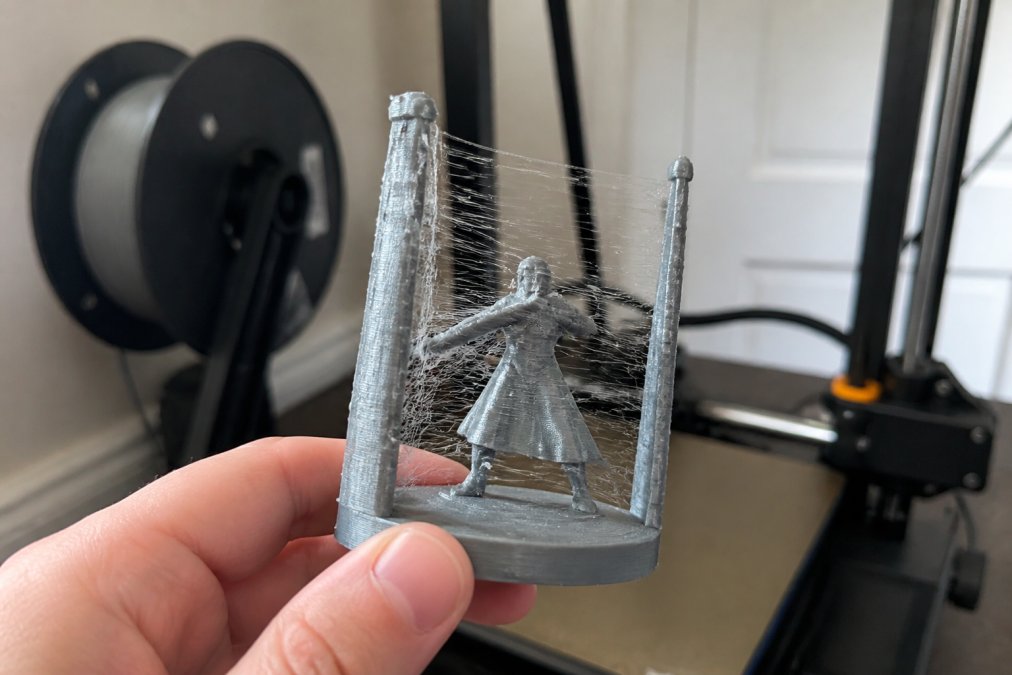
Two things cause it, and they're easy to confuse:
- Stringing is thin strands pulled between separate parts of the print.
- Oozing is the blob or drip that forms when the nozzle sits still or moves slowly.
3D Printer Retraction Settings That Stop the Strings
Retraction is the fix most people reach for first: the slicer pulls filament back into the nozzle before a travel move so nothing drips out. But it's not one number, it's a system of settings that must agree with each other and your hardware.
Direct Drive vs. Bowden: Why the Same Numbers Fail on Both
A direct drive extruder mounts the motor right above the nozzle. A Bowden setup pushes filament through a long PTFE tube that flexes under pressure, eating up most of your retraction before the filament at the nozzle moves.
Use this decision path before you touch a number:
- Identify your extruder type. Direct drive = motor on the toolhead. Bowden = motor on the frame with a tube to the hotend.
- Set distance first, speed second. Distance controls how much pressure you relieve; speed controls how fast.
- Start low and step up. 0.1 mm steps on direct drive, 0.5 mm on Bowden.
- Stop as soon as strings disappear. More retraction isn't better, just more risk of grinding and clogs.
Z-Hop, Coast at End, and Wipe Distance Explained
Three slicer settings handle the leftover pressure that retraction alone can't clear:
- Z-hop lifts the nozzle slightly during travel moves so it clears the print surface and any already-printed features.
- Coast at end stops extruding slightly before the end of a line, letting residual pressure finish the job instead of over-extruding at the seam.
- Wipe distance drags the nozzle along the last path to wipe off the drip before the travel move begins.
Slicer-Specific Starting Points
Here's where to find these settings in the slicers most people actually run:
- OrcaSlicer: Filament Settings → Setting Overrides → Retraction. Distance, speed, z-hop, and wipe are all on one panel. OrcaSlicer also has a built-in retraction test under Calibration that writes the results directly into a profile.
- PrusaSlicer: Printer Settings → Extruder 1 → Retraction. Coast is under Print Settings → Extruder → "Coast at end." Wipe is under Print Settings → Extruder → "Wipe while retracting."
- Cura: Settings → Travel → Retraction Distance, Retraction Speed, Retraction Retract Speed. Enable "Combing Mode" to keep travel moves inside the part, this alone eliminates a large share of surface stringing on models with internal geometry.
- Bambu Studio: Filament Settings → Advanced → Retraction. Bambu printers ship with tuned profiles, so only adjust after you've confirmed the filament is dry and the nozzle is clean.
The Order to Change Things
Change one setting at a time or you'll never know what fixed it. The sequence:
- Dry the filament.
- Lock in nozzle temperature with a temperature tower.
- Set retraction distance with a retraction tower.
- Set retraction speed with a second tower.
- Add z-hop, coast, and wipe one at a time.
- Enable combing last, since it changes travel paths and can mask or reveal other issues.
The Best Temperature for PLA Printing Without Whiskers
Lower nozzle temperature is the second-biggest lever you have. Hotter plastic flows more freely, and free-flowing plastic strings more.
Filament Moisture Issues: The Hidden Cause of Hairy Prints
Wet filament is the cause nobody checks when 3D prints stringy results appear. PLA and PETG are hygroscopic, absorbing water from the air. When that water hits the hot nozzle, it flashes to steam and pushes plastic out with it. The result looks exactly like stringing, so people adjust retraction for hours while the real problem sits on the spool.
Signs your filament needs dehydration:
Filament Feeder System for Creality →
- Popping or crackling sounds while printing
- Visible steam or bubbles at the nozzle
- A rough, matte surface on parts that used to print glossy
- Strings that appear even after you've dialed retraction in
Travel Speed and Acceleration: Getting the Nozzle Out Fast
Faster travel moves give molten filament less time to drip. Bump travel speed to 150 mm/s or higher if your printer handles it. Travel acceleration matters just as much, a slow ramp-up means the nozzle lingers at the end of each line. Raising it to 3,000-5,000 mm/s² gets the head moving immediately.
| Setting | Typical Range | What It Fixes |
|---|---|---|
| Retraction distance | 0.5-1 mm (direct), 4-6 mm (Bowden) | Stringing between parts |
| Retraction speed | 25-45 mm/s | Slow, drippy travel moves |
| Nozzle temperature | 195-210°C for PLA | Excess flow and whiskers |
| Travel speed | 150+ mm/s | Drip time during moves |
| Z-hop | 0.2 mm | Nozzle dragging through strings |
Cooling, Nozzle Wear, and the Maintenance Checks Most People Skip
Part cooling fans set the plastic fast, stopping strands from stretching. If your fan is weak or poorly ducted, strings get longer. Run PLA cooling at full speed after the first layer.
Run a Retraction Tower Before You Change Anything Else
Change one setting at a time using a retraction tower, a test print that varies retraction distance and speed up its height, showing exactly where strings disappear. It's the most useful diagnostic tool for stringing, and most guides tell you to print one without telling you how to read it.
How to Read a Retraction Tower
A retraction tower is a tall, narrow print with two or more thin posts. As it rises, the slicer changes one retraction value in steps. Find the height where strings stop appearing between the posts, then read the value active at that height.
Here's what the results actually mean:
- Strings all the way to the top: retraction distance is too low across the whole range. Reprint with a higher starting value.
- Strings at the bottom, clean at the top: the transition height tells you the minimum retraction distance that works. Use that value, or add a small margin.
- Clean at the bottom, strings at the top: you've gone past the useful range and the extruder is grinding or the pressure is behaving unpredictably. Use the lowest clean value, not the highest.
- Clean in the middle, strings at both ends: the middle band is your working window. Pick the center of it.
- No strings anywhere: your retraction is fine. The problem is temperature, moisture, or travel speed, go back and check those.
- Blobs or zits at the top of the tower: z-hop is too high or coast is too aggressive. Reduce both.
The Diagnostic Gallery: Is It Stringing, Oozing, or Under-Extrusion?
Most people misdiagnose their own print. Before you tune anything, compare what you're seeing to these patterns:
- Fine, hair-like threads between two separate features → stringing. Travel-move problem. Fix with retraction, travel speed, and combing.
- A single thick strand or a blob hanging off the nozzle → oozing. Pressure problem. Fix with temperature, coast, and wipe.
- Strings that only appear on the outside of curved walls → travel moves crossing open air. Fix with combing mode and z-hop.
- Strings inside a hollow model → usually harmless, and often a sign combing is already working. Only address if the strings are visible through an opening.
- Rough, matte surface plus strings → wet filament. Dry it before touching retraction.
- Gaps in walls plus strings → under-extrusion masking as stringing. Check for a partial clog, a worn nozzle, or a miscalibrated e-steps value.
- Strings plus a popping sound → moisture. Always moisture.
The Sequence That Works
- Dry your filament first, so moisture isn't skewing results. A wet spool will string no matter how good your retraction is.
- Print a temperature tower and lock in your nozzle temperature. Temperature affects flow, and flow affects stringing.
- Print a retraction distance tower. Read the clean band. Pick the lowest value inside it.
- Print a retraction speed tower at that distance. Speed usually matters less than distance, but it can eliminate the last few strands.
- Adjust z-hop, coast at end, and wipe distance last, one at a time, reprinting a small test between each change.
- Enable combing mode and reprint the same model. If strings drop further, keep it on.
- Save the profile and label it with the filament brand, color, and date. Filament formulations change between batches, and a profile that works today may need a small tweak on the next spool.
This takes about an hour per filament type; guessing takes longer and never sticks.
When the Tower Doesn't Help
If you've run a temperature, distance, and speed tower and strings remain, the problem is almost never retraction. Check these in order:
- Nozzle wear. A worn brass nozzle has an enlarged opening and extrudes more plastic than the slicer expects. Swap it.
- Partial clog. A clogged nozzle produces inconsistent flow that looks like stringing on some moves and under-extrusion on others.
- Filament diameter out of spec. Measure with calipers in three places. If it's outside the manufacturer's tolerance, replace the spool.
- Extruder tension. Too loose and the filament slips; too tight and it grinds. Both produce inconsistent pressure.
- Ambient drafts. A fan or air conditioner blowing across the bed changes how strands cool and stretch. Move the printer or block the draft.
Frequently Asked Questions
How do I stop my 3D prints from being stringy?
Start with retraction. If you have a Bowden tube setup, try a retraction distance around 5-7 mm at 40-50 mm/s. Direct drive extruders usually need far less, often 0.5-1.5 mm. Then dry your filament, drop nozzle temperature by 5-10 degrees Celsius, and raise travel speed so the nozzle leaves an area before molten filament can drip. Change one setting at a time and print a retraction tower after each adjustment so you can see which change actually helped.
Why do all my 3D printed things come out stringy?
When every print strings, the cause is usually constant rather than model-specific. The three most common culprits are wet filament, a retraction distance that is too short for your extruder type, and nozzle temperature running hotter than the filament needs. PLA that has absorbed moisture produces steam inside the hot end, which pushes melted plastic out during travel moves. Weigh your spool before and after drying: if it loses a gram or two, moisture was part of the problem.
Does print temperature affect stringing?
Yes, and it is often the fastest fix to test. Hotter filament flows more easily, so it drips from the nozzle during travel moves. Most PLA prints cleanly between 190 and 210 degrees Celsius, and dropping 5 to 10 degrees from your current setting frequently removes light stringing on its own. Go too low, though, and you risk poor layer adhesion and a clogged nozzle. Print a temperature tower to find the coolest setting that still gives you strong layers.
How does retraction distance impact print quality?
Retraction pulls filament back from the nozzle during travel moves so melted plastic does not leak out. Too little distance leaves strings and whiskers. Too much distance pulls molten plastic up into the cold zone, where it can stick and cause a clog or grinding at the extruder gear. The right number depends on your setup: Bowden tubes need more distance because the filament has slack to travel, while direct drive extruders respond to under 2 mm. A retraction tower test finds your printer's sweet spot in about 20 minutes.