

Table of Contents
- Why Stringing Happens and How to Read the Evidence
- The Best Retraction Settings for PLA (and Starting Points for PETG and ABS)
- A 3D Printer Nozzle Temperature Guide for Ooze Control
- Moisture in Filament and Stringing: The Drying Step Most People Skip
- Travel Speed, Z-Hop, and Combing: Slicer Moves That Stop Strings
- Pressure Advance and Firmware-Level Fixes Most Guides Skip
- Common Mistakes That Keep 3D Printed Items Stringy
- Can You Fix Stringing After the Print Is Finished?
- Frequently Asked Questions
Last Updated: September 11, 2026
Why Stringing Happens and How to Read the Evidence
Stringing on 3D printed items happens when molten plastic keeps flowing out of the nozzle during travel moves, leaving thin threads between separate parts of the model, which is why avoiding stringing starts with understanding that flow. The root cause is almost always pressure that has nowhere to go when the extruder stops pushing.
Reading the evidence matters more than guessing. Long, wispy threads that stretch across open space point to oozing from residual nozzle pressure. Short fuzz along the outer walls usually means moisture in the filament is flashing to steam inside the hotend. Blobs at the start or end of a travel move suggest retraction is too slow or too short to relieve pressure in time.
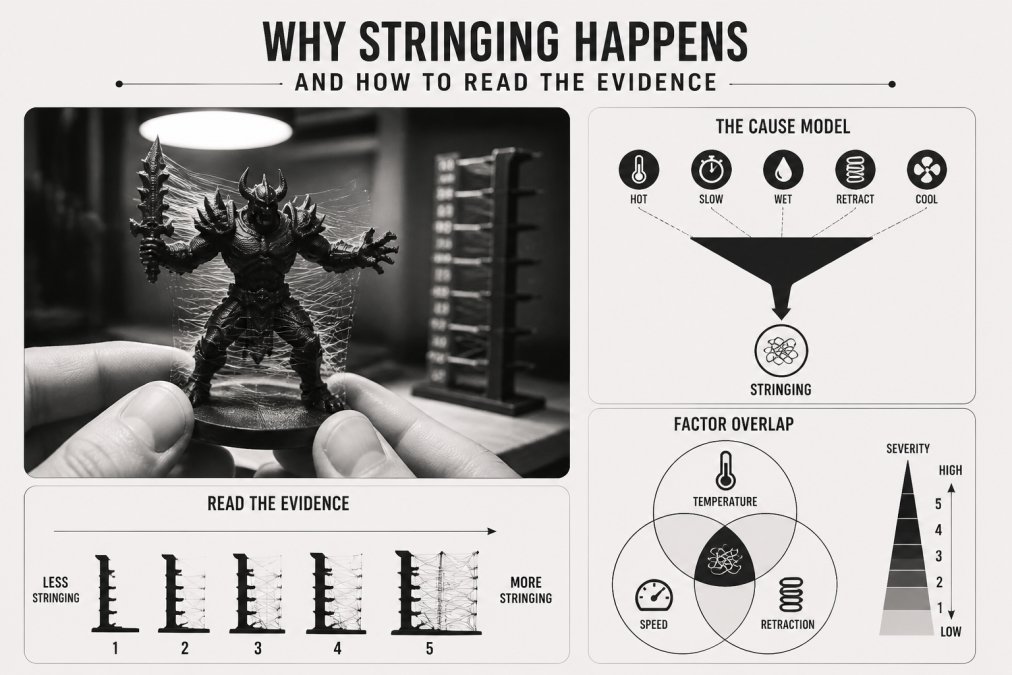
Oozing, Whisping, and Blobbing: Three Different Problems
Oozing is continuous flow from a pressurized nozzle. Whisping is the fine, hair-like residue left when a small amount of ooze stretches thin across a gap. Blobbing is a pressure spike that dumps extra material at one point. Each one has a different fix, which is why a single "turn up retraction" answer rarely solves the problem.
The Best Retraction Settings for PLA (and Starting Points for PETG and ABS)
The best retraction settings for PLA on a direct drive extruder start around 0.8-1.2 mm at 35-45 mm/s. Bowden setups need far more length, typically 4-6 mm, because the filament has slack to take up inside the tube before the nozzle actually feels the pull.
Treat these as starting points, not gospel. Every hotend, nozzle, and filament brand shifts the sweet spot.
| Material | Direct Drive Length | Bowden Length | Retraction Speed |
|---|---|---|---|
| PLA | 0.8-1.2 mm | 4-6 mm | 35-45 mm/s |
| PETG | 1.0-1.5 mm | 5-7 mm | 25-35 mm/s |
| ABS | 0.8-1.2 mm | 4-6 mm | 35-45 mm/s |
PETG wants a slower retraction speed than PLA because it is stickier and tends to tear rather than snap cleanly. ABS behaves closer to PLA but benefits from an enclosure to keep the nozzle temperature stable.
Bowden Tube vs Direct Drive: Why the Numbers Differ
A Bowden tube adds several centimeters of flex between the extruder and the hotend. That flex absorbs part of every retraction command, so the extruder has to pull more filament to get the same pressure relief at the nozzle. Direct drive mounts the extruder right on the carriage, so retraction is nearly instant and lengths stay small.
A 3D Printer Nozzle Temperature Guide for Ooze Control
Lower nozzle temperature reduces ooze. That is the short version. PLA prints cleanly between 195-210°C, PETG between 230-245°C, and ABS between 230-250°C, and dropping 5-10°C from your current setting is often enough to cut stringing noticeably without hurting layer adhesion.
The trade-off is real. Run too cold and you get poor interlayer bonding, rough surfaces, and under-extrusion. Test in small steps: print a stringing test tower at your current temperature, then repeat at 5°C lower until strings thin out or layer strength suffers.
Prusa Knowledge Base on temperature settings
Moisture in Filament and Stringing: The Drying Step Most People Skip
Moisture in filament and stringing are directly linked. Wet filament flashes to steam as it passes through the hotend, and that steam pushes small amounts of plastic out of the nozzle during travel moves. PLA absorbs moisture from the air within days in humid conditions.
Dry your filament before chasing slicer settings. A dedicated dryer at 45-50°C for 4-6 hours handles PLA; PETG needs closer to 60-65°C for 6 hours. Store spools in a sealed container with desiccant once dry.
Travel Speed, Z-Hop, and Combing: Slicer Moves That Stop Strings
Faster travel moves reduce stringing because the nozzle spends less time crossing open space, making travel speed a core part of avoiding stringing. Bumping travel speed to 150-200 mm/s on a well-tuned printer gives ooze less time to stretch into a visible thread. The limit is your motion system: if corners round off or the frame shakes, back the speed down until the geometry stays crisp.
Z-hop lifts the nozzle slightly during travel so it clears the print instead of dragging across it. A hop of 0.2-0.4 mm is usually enough. Enable combing so the slicer routes travel moves through the interior of the part where strings get buried inside the walls rather than left exposed on the surface.
- Travel speed: raise until the motion system stays accurate
- Z-hop height: 0.2-0.4 mm, higher only if the nozzle drags
- Combing mode: "Within infill" or "All" depending on your slicer
- Avoid crossing outlines: enable it to keep travel inside the part
How the Same Settings Look in Cura vs. PrusaSlicer
Most guides tell you to "enable combing" or "turn on Z-hop" without showing where those controls live or how the two most common slicers differ. That gap is worth closing because the settings are not named the same way, and the defaults behave differently.
| Setting | Cura | PrusaSlicer |
|---|---|---|
| Combing | Combing Mode: Off / Not in Skin / Within Infill / All | Avoid Crossing Perimeters (checkbox) + "Travel" settings |
| Z-hop | "Z Hop When Retracted" + "Z Hop Height" | "Lift Z" + "Lift Z Height" |
| Travel speed | "Travel Speed" under Speed | "Travel" under Speed |
| Retract on layer change | "Retract at Layer Change" | "Retract on Layer Change" |
| Wipe | "Enable Coasting" / "Wipe Nozzle" | "Wipe While Retracting" |
A few practical differences matter. Cura's "Combing Mode: Within Infill" is the safest default for parts with visible outer walls because it keeps travel inside the infill region and away from the skin. PrusaSlicer's "Avoid Crossing Perimeters" is a checkbox, not a mode, and it works alongside "Wipe While Retracting" to smear the last bit of ooze into the wall instead of leaving it as a thread. If you enable both combing and wipe, you often see the biggest drop in surface strings without touching retraction length at all.
Cooling Fan and Layer Height Adjustments
More cooling helps PLA because the plastic solidifies before it can stretch into a thread. Run the part cooling fan at full speed for PLA, but back it off for ABS and PETG, where too much cooling causes warping and weak layer bonds. A common starting split is 100% fan for PLA, 30-50% for PETG, and 0-20% for ABS with an enclosure.
Thinner layers reduce stringing slightly because there is less molten material in the nozzle at any moment. Moving from 0.2 mm to 0.16 mm layer height is a small, low-risk change worth testing. The trade-off is print time: a 0.16 mm layer height adds roughly 20-25% to print duration on the same model, so test it on a small stringing tower before committing a long print to it.
Pressure Advance and Firmware-Level Fixes Most Guides Skip
Pressure advance, called linear advance on Marlin firmware, compensates for the lag between extruder motion and actual nozzle pressure. It is the single most effective firmware-level fix for stringing, and most beginner guides skip it entirely.
Calibrate it by printing a test pattern and adjusting the value until corners stay sharp and extrusion stays consistent through speed changes. Klipper uses pressure_advance; Marlin uses LIN_ADVANCE. Once dialed in, retraction length often drops because the firmware is already managing pressure.
Common Mistakes That Keep 3D Printed Items Stringy
Chasing retraction length alone is the biggest mistake. Retraction is one variable among several, and pushing it too far causes grinding, clogs, and inconsistent extrusion that look worse than the original stringing.
Other frequent errors:
- Skipping a stringing test print before changing multiple settings at once
- Using wet filament and blaming the slicer
- Running PETG at PLA retraction speeds
- Ignoring travel speed because retraction "should" handle it
- Never calibrating pressure advance
Change one setting at a time and print a small test between each change. It takes longer, but you actually learn what your printer responds to.
All3DP guide to retraction tuning
Can You Fix Stringing After the Print Is Finished?
Yes, and for display pieces it is often faster than reprinting. Most guides stop at prevention and never explain how to safely remove strings that already exist, which is a real gap because a finished miniature with a few wisps is usually salvageable in under a minute. The key is matching the tool to the string thickness and the material, because the wrong approach melts detail or scratches the surface.
Match the Tool to the String
- Heat gun (fine wisps on PLA, PETG, ABS): Pass the nozzle 6-12 inches from the surface in quick, sweeping strokes. The strings shrink back before the part softens because they have far less thermal mass. Keep the gun moving and never hold it still over one spot. A hair dryer on its highest setting works for PLA in a pinch but is slower and less even.
- Hobby knife or flush cutters (thick strands): Support the part with one hand and cut with the blade angled away from the surface. Pulling strings off by hand can tear surface layers on thin-walled prints, so cut rather than yank.
- Fine sanding (residue after cutting): 400-600 grit wet-or-dry paper removes the little nubs left behind. Sand wet on PLA to keep the paper from loading up, and go lightly around fine details like faces and fingers.
- Deburring tool (inside holes and slots): A small deburring tool reaches strings the knife cannot and cleans up holes without enlarging them.
Material-Specific Cautions
PLA is the most forgiving: heat, cut, and sand all work, and the plastic tolerates a quick heat-gun pass without visible gloss change. PETG is stringier and its strings are tougher, so a knife usually beats a heat gun because PETG tends to smear rather than shrink. ABS responds well to a heat gun, but the same heat that shrinks strings can also soften fine features, so keep the passes short and the distance generous. TPU strings are rubbery and stretch instead of snapping; cut them with sharp flush cutters rather than pulling, and avoid heat entirely because TPU deforms easily.
When to Reprint Instead of Repair
If strings are dense enough to obscure surface detail, or if they run through functional areas like threads, snap-fit joints, or moving parts, repair is usually not worth the time. Strings inside a threaded hole will bind the screw; strings across a hinge will change the fit. In those cases, fix the root cause (retraction, temperature, moisture, or pressure advance) and reprint, because the repaired part will not perform like a clean one.
For figurines and decorative items, a hobby knife handles the thicker strands, and light sanding with 400-600 grit smooths the surface afterward. This is standard practice for painted miniatures and display models, and it is how many finished pieces end up looking clean despite imperfect slicer settings.
MatterHackers post-processing guide
If you would rather skip the tuning entirely, our Filament Feeder System for Creality Ender-3 V3 KE moves the spool off the top of the printer, cutting the wobble that shakes loose strings onto the part.

Frequently Asked Questions
Why does my PLA keep stringing even after I lowered the temperature?
Temperature is only one input. If retraction length is too short for a Bowden tube setup, or the filament has absorbed moisture, lowering the nozzle temperature alone will not stop the ooze. Check retraction distance first, then dry the spool at 45 to 50 C for four to six hours, then rerun a stringing test tower. Change one variable at a time so you know which fix actually worked.
What temperature prevents stringing on a 3D printer?
There is no single number, but most PLA prints cleanly between 190 and 205 C. Start at the low end of the manufacturer's range and increase in 5 C steps until extrusion stays consistent. PETG usually needs 230 to 245 C and ABS 230 to 250 C, and both ooze more than PLA, so pair the temperature change with a longer retraction distance and a slightly faster retraction speed.
Does print speed affect stringing?
Yes, mainly through travel speed. Faster travel moves give the nozzle less time to drip between two points, so raising travel speed to 150 to 200 mm/s often removes thin strings without touching retraction. Print speed itself matters less, though dropping it too low increases the time the hotend sits still over the part, which makes oozing worse rather than better.
Is it possible to fix stringing after the print is finished?
Thin wisps can be removed with a heat gun passed quickly over the surface, which shrinks them back without melting the model. For heavier strings, use flush cutters or a sharp hobby knife, then sand lightly with 400 grit. Post-processing hides the symptom, not the cause, so treat it as a finish step and still tune retraction and moisture for the next print.