

Table of Contents
- What Defines Quality 3D Prints: Beyond the Surface
- Visual Inspection Checklist for Quality 3D Prints
- Why Do 3D Prints Get Stringy Textures?
- How to Check 3D Print Dimensional Accuracy
- Common 3D Printing Defects and Solutions
- Testing Structural Integrity and Layer Adhesion
- Material-Specific Quality Benchmarks
- Final Checks Before You Buy
- Frequently Asked Questions
Last Updated: September 7, 2026
What Defines Quality 3D Prints: Beyond the Surface
Quality 3D prints are objects where dimensional accuracy, layer consistency, and material integrity all meet the intended design specifications without visible defects or structural weakness. A truly high-quality part looks clean, feels solid, and functions exactly as intended, whether it is a desk organizer or a decorative figurine. Most people judge quality by surface appearance alone, but that only captures part of the story.
The real test happens when you inspect layer adhesion, check measurements against the model file, and apply stress to joints. At CamGait3D Creations, our products are crafted with attention to detail and durability, so a print which looks good on a shelf can still function under regular use. This guide walks you through how to spot quality 3D prints using visual, mechanical, and dimensional checks that go far deeper than a quick glance.
Below, we will show you exactly how to evaluate layer lines, measure accuracy, test strength, and identify the common defects that separate professional-grade output from failed experiments.
Visual Inspection Checklist for Quality 3D Prints
A systematic visual inspection is the first gate in a quality assessment, but it must go beyond a casual glance. The difference between a hobbyist part and a professional-grade piece often lies in the discipline of the inspection method. Here is a structured protocol that reveals defects most people miss.
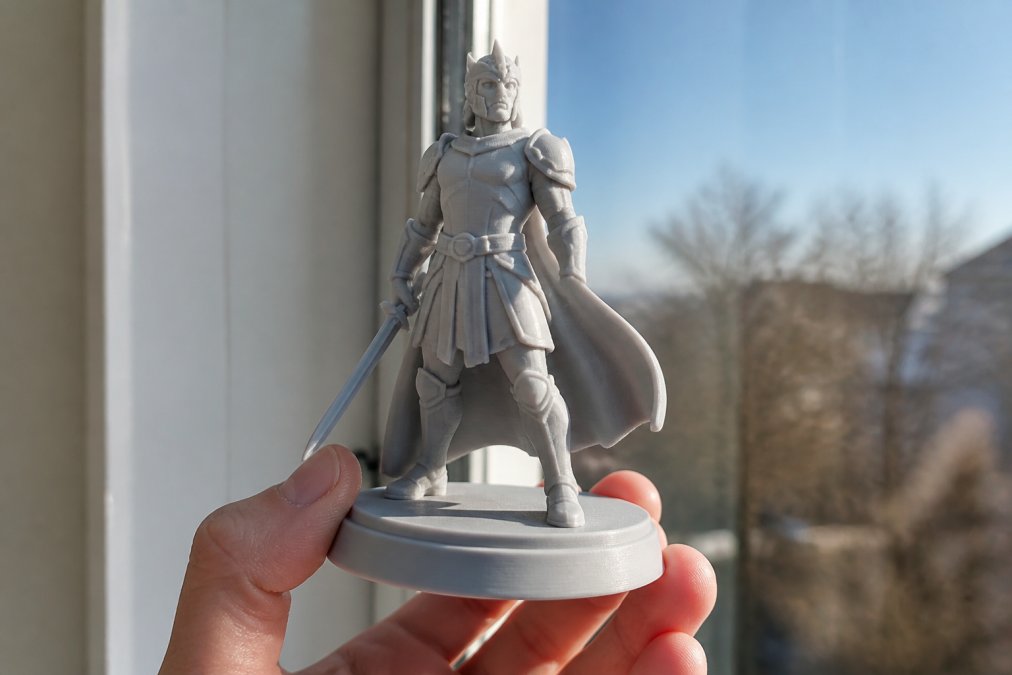
Step 1: The Raking Light Test
Hold the part under a single, bright light source (a desk lamp or phone flashlight) positioned at a low angle, nearly parallel to the surface. This is called a raking light. It casts shadows across the layer lines, making inconsistencies in layer height, zits, and minor surface roughness dramatically visible. Move the light around the part in a full circle, then repeat from above. A quality print will show a uniform, rhythmic pattern of lines. Irregularities, a sudden thick line, a dip, or a scar, indicate a flow or mechanical issue during that specific layer.
Step 2: The Magnified Seam Audit
Every FDM print has a seam where each layer's extrusion starts and stops. The quality of this seam is a major indicator of slicer calibration. Use a jeweler's loupe (10x) or a phone camera zoomed to 3x-5x to find the seam. On a quality print, the seam is either:
- Hidden: Placed on an internal corner or a non-critical edge by the slicer.
- Clean: A subtle, flat transition with no raised blob or deep pit.
A poor seam shows a pronounced zit (over-extrusion at the start) or a divot (under-extrusion). This is not a cosmetic issue; a severe seam can act as a stress riser, initiating cracks in a functional part.
Step 3: The Overhang and Bridge Inspection
Overhangs and bridges are where cooling and extrusion are most stressed. Inspect the underside of any overhang greater than 45 degrees. A quality print will show a slightly rough but fully formed surface. Look for:
- Sagging: Drooping filaments that indicate insufficient cooling.
- Gaps: Visible holes between lines that indicate the layer height exceeded the material's capability.
- Curling: Upward-turned edges on the overhang, a sign of thermal warping during the print.
For bridges (horizontal spans), a quality result is a flat, tight underside with no dangling strings. If you see significant droop, the part's structural integrity in that span is compromised.
Step 4: The First Layer Forensic Check
Even if the top looks perfect, the first layer tells you about the entire print's foundation. Flip the part over and examine the bottom surface:
- Elephant Foot: A flared-out bottom edge indicates the nozzle was too close to the bed or the bed was too hot, causing the first layers to squish outward. This ruins dimensional accuracy at the base.
- Gaps Between Lines: Visible gaps on the bottom layer mean the nozzle was too far from the bed, leading to poor adhesion and a weak foundation.
- Uniform Texture: A quality first layer is smooth and slightly glossy, showing that the lines have been squished together into a solid sheet.
Step 5: The Gloss and Sheen Consistency Test
Material and temperature affect surface gloss. A sudden change in sheen across a vertical wall, for example, a matte section next to a glossy section, is a sign of a temperature fluctuation or a partial nozzle clog that changed the extrusion characteristics mid-print. This is a subtle defect that often goes unnoticed but indicates a lack of process stability.
This visual protocol moves beyond 'looking for stringing' and into a systematic evaluation of the printer's mechanical and thermal performance as recorded in the plastic. It is the first step in separating a lucky print from a reliably calibrated machine.

Why Do 3D Prints Get Stringy Textures?
Stringy textures appear when molten filament leaks from the nozzle during travel moves, leaving thin wisps of plastic across the print. This happens because the filament does not retract cleanly back into the nozzle, so residual material drips out as the print head moves to a new location.
The primary causes trace back to three settings in your slicer:
- Retraction distance set too low for your direct drive or Bowden setup
- Nozzle temperature running hotter than the filament requires
- Print speed allowing too much time for ooze to accumulate
Stringing directly relates to how to spot quality 3D prints because it is the most visible defect buyers notice first. Fix it by increasing retraction distance in small increments, lowering nozzle temperature by 5 to 10 degrees, and enabling coasting or wipe settings. For hygroscopic materials like nylon and PETG, moisture absorption worsens stringing significantly, so drying filament before printing makes a measurable difference (PubMed).
How to Check 3D Print Dimensional Accuracy
Dimensional accuracy measures how closely the printed part matches the intended dimensions from the CAD model. A quality print holds tolerances within 0.2 to 0.4 mm for most functional parts, while precision engineering applications demand tighter control (nist.gov).
Use digital calipers to verify critical dimensions against the model file. Measure across multiple points, not just one spot, because warping or shrinkage can distort parts unevenly. Check hole diameters with pin gauges or the appropriate drill bit to confirm they accept fasteners without forcing.
For a quick accuracy test, print a calibration cube and measure all three axes:
- X and Y dimensions should match within 0.2 mm of the model
- Z dimension often runs slightly tall due to first layer over-squish
- Wall thickness should equal two times your extrusion width
Common 3D Printing Defects and Solutions
Every 3D printer operator encounters defects, but knowing which ones matter for quality assessment separates experienced makers from beginners. Some flaws are cosmetic, while others signal structural problems that compromise the part.
| Defect | Visual Sign | Primary Cause | Quality Impact |
|---|---|---|---|
| Warping | Corners lifting off the bed | Poor bed adhesion, thermal shrink | Structural failure risk |
| Ghosting | Ripples repeating after edges | Loose belts, high print speed | Cosmetic, reduces precision |
| Under-extrusion | Gaps between layer lines | Clogged nozzle, low flow rate | Weakens part significantly |
| Over-extrusion | Blobs and rough surfaces | Flow rate too high | Poor surface finish |
| Layer shifting | Misaligned layers | Loose belts, mechanical binding | Ruins dimensional accuracy |
Layer adhesion problems often show up as parts that split along layer lines under pressure. This defect ranks among the most serious because it compromises structural integrity while the surface may still appear acceptable. Check adhesion by applying firm pressure at layer boundaries and listening for cracking sounds.
Testing Structural Integrity and Layer Adhesion
Visual inspection tells you about calibration; mechanical testing tells you about strength and material integrity. A part that looks flawless can still fail catastrophically under load if the layers are not properly fused. This is where you move from being a viewer to an inspector. Here is a tiered approach to mechanical validation.
Tier 1: The Non-Destructive Flex Test
Start with a controlled, gentle flex. Hold the part firmly and apply pressure to the thinnest structural section, a wall, a clip, or a joint. You are listening and feeling for two things:
- The Creak: A faint, crackling sound under pressure is the sound of individual layers delaminating. This is a critical failure warning. It means the bond between layers is weaker than the material itself.
- The Snap: A clean, sudden break along a single layer line indicates a complete lack of interlayer fusion, often caused by printing too cold or with a layer height too large for the nozzle diameter.
A quality print will exhibit a degree of plastic deformation, it will bend slightly before it breaks, and the fracture surface will look rough and fibrous, not smooth and glassy.
Tier 2: The Torsion Test for Functional Parts
For parts that will be twisted or turned, like knobs or handles, apply a slow, steady torsional force. This tests the bond between the outer wall and the infill. A common failure mode is the outer wall separating from the internal grid. If you see the wall begin to peel away from the infill, it indicates a low infill overlap percentage in the slicer or a too-low extrusion temperature.
Tier 3: The Impact and Stress Test
For parts that will bear weight or endure impact, a simple drop test from a height of 3 feet onto a hard surface is a practical benchmark. A quality PLA part might chip, but it should not shatter into multiple pieces. A poorly printed part will break along layer lines. For functional parts like a phone stand or a cable clip, apply the expected load for 30 seconds and observe for creep or deformation.
The Calibration Correlation
These mechanical failures are not random; they are direct feedback on your printer's calibration:
- Layer Separation: Often caused by a nozzle temperature that is too low for the filament's optimal range. For example, many PLA blends print well at 200°C, but a quality structural part often requires 215°C to ensure proper layer fusion (all3dp.com).
- Brittle Failure: Can be caused by filament that has absorbed moisture, which degrades the polymer chain, making it brittle.
- Wall Delamination: Points to a slicer setting issue, specifically the infill/wall overlap, which should typically be set to 15-30% to create a mechanical bond between the shell and the internal structure.
A quality print is not just one that looks good; it is one that behaves predictably under stress. The flex test is your first line of defense, but understanding the type of failure, whether it's a clean snap, a delamination crack, or a wall separation, gives you a precise diagnostic path back to your printer settings. This mechanical inspection is the final, non-negotiable step in verifying that a part is not just aesthetically pleasing, but functionally sound.
Material-Specific Quality Benchmarks
Quality expectations shift dramatically depending on the filament material you are evaluating. Each polymer carries distinct properties that change how defects appear and what tolerances you should expect.
PLA remains the most forgiving material, producing crisp details and sharp corners at lower temperatures. Quality PLA prints show excellent bed adhesion with minimal warping, though the material stays brittle and may crack under repeated stress. PETG offers better durability but tends toward stringing and requires drier storage due to its hygroscopic nature. ABS demands an enclosure to prevent warping and layer separation, making quality prints harder to achieve without controlled conditions.
For flexible filaments like TPU, quality means consistent extrusion without gaps between layers, since the material compresses during printing. Check that overhangs and bridges remain clean, as flexible materials handle these features differently than rigid plastics.
Final Checks Before You Buy
When purchasing 3D printed items from any seller, apply the same inspection standards covered throughout this guide before committing your money. Ask for photos that show the part from multiple angles under direct lighting, and request details about layer height, infill density, and material type.
Quality sellers should readily answer questions about their print settings and post-processing. A common mistake among buyers is assuming all 3D prints share the same quality baseline, when in reality, the difference between a hobbyist print and a professionally finished piece comes down to calibration discipline and material selection.
At CamGait3D Creations, from adorable themed figurines to functional gaming accessories, we craft each piece with attention to detail and durability, so what arrives matches what you saw on screen. From adorable themed figurines to functional gaming accessories, we craft each piece with attention to detail and durability, so what arrives matches what you saw on screen.
Frequently Asked Questions
What are the most common signs of a low-quality 3D print?
Look for stringy textures, rough spots, visible layer shifting, and gaps between layers. Quality 3D prints have uniform layer lines, clean edges, and no blobs or zits on the surface. Check for warping at the base and make sure details are sharp rather than mushy or melted-looking.
How does layer height affect the quality of a 3D print?
Layer height directly controls how visible the layer lines are. Smaller layer heights like 0.12mm produce smoother surfaces with finer detail, while larger heights like 0.28mm print faster but show more noticeable ridges. For quality 3D prints, consistent layer lines that are evenly spaced matter more than the actual height number.
What should I look for when inspecting 3D printed figurines?
Check the face and small details first, since those show print quality fastest. Look for clean overhangs without drooping, smooth curves without faceting, and no stringy textures between separate parts. Flip the figurine over and examine the bottom layers for proper first layer squish and adhesion.
Does the type of filament used impact the final print quality?
Yes. PLA prints crisp details but can be brittle, while PETG offers better durability with a slightly glossier finish. ABS and ASA resist heat but are harder to print cleanly. Moisture absorption in hygroscopic filaments like nylon causes bubbles and poor surface finish, so filament storage matters as much as the material choice.
Quality 3D prints are not accidents. They result from careful calibration, proper material handling, and honest inspection at every stage. When you shop for printed goods, apply the standards in this guide and expect sellers to meet them. Get started with CamGait3D Creations and browse designs that combine charm with genuine durability built to last.