

Table of Contents
- Why a Durable 3D Printed Controller Stand Beats Store-Bought
- Universal Fit and Modular Design for Any Controller
- Best Filament for Gaming Accessories: PLA vs PETG vs ABS
- Print Settings for a Durable 3D Printed Controller Stand
- Stability and Weight Distribution: No More Wobble
- 3D Printed Gaming Setup Ideas: Controller Dock and Cable Management
- Post-Processing and Weight Testing for Long-Term Durability
- Frequently Asked Questions
Last Updated: September 22, 2026
Why a Durable 3D Printed Controller Stand Beats Store-Bought
A durable 3D printed gaming controller stand is a custom-printed accessory designed to hold your controller securely, built with the right materials and print settings so it survives daily use instead of cracking under pressure. A durable 3D printed gaming controller stand is a custom-printed accessory designed to hold your controller securely, built with the right materials and print settings so it survives daily use instead of cracking under pressure.
Store-bought stands share a common weakness: they're molded for a single controller shape and built to a price point.
Print your own and you control everything. Wall thickness. Infill. Filament. Fit.
A common mistake is judging a print by how it looks fresh off the bed. The real test is how it holds up after a hundred controller drops into the cradle.
Universal Fit and Modular Design for Any Controller
Universal fit means the cradle uses adjustable geometry, not a fixed mold, so it grips PlayStation, Xbox, and Switch Pro controllers without wobbling. Modular assembly takes that further: separate base, cradle, and accessory arms that snap together.
Snap-fit joints let you swap parts without glue or tools. If one piece wears out, you reprint a single component instead of the whole stand.
Design features worth prioritizing:
- A sloped cradle floor so controllers settle into the same position every time
- Removable dividers for different controller widths
- A base wide enough to resist tipping when you grab the controller one-handed
- Print-in-place hinges for adjustable viewing angles
What most guides miss is that "universal" usually means "fits nothing well." Check the STL files for actual dimensions before printing. A cradle sized for a Switch Pro will swallow an Xbox controller's grips.
Best Filament for Gaming Accessories: PLA vs PETG vs ABS
PETG is the best all-around filament for a gaming controller stand that gets handled daily. It flexes slightly under load instead of cracking, tolerates the warmth of a desk near a PC or console, and prints without an enclosure. But "best" depends on where the stand lives and how hard it gets used, so here is the material breakdown that actually matters for structural parts.
The three properties that decide whether a stand survives are glass transition temperature (when the plastic starts to soften), creep resistance (whether it sags under constant load), and interlayer bonding (whether it splits along layer lines).
| Filament | Glass Transition | Creep Resistance | Interlayer Bonding | Print Difficulty | Best For |
|---|---|---|---|---|---|
| PLA | ~140°F | Low, sags under sustained load | Strong on a tuned printer | Easiest | Display pieces, cool rooms, light use |
| PLA+ | ~140°F | Slightly better than PLA | Stronger than standard PLA | Easy | Budget daily-use stands in cool rooms |
| PETG | ~185°F | High, flexes and recovers | Good, but strings | Easy, slower speeds | Daily-use stands and docks |
| ABS | ~220°F | High | Strong when enclosed | Hard, warps, needs enclosure and ventilation | Hot rooms, heavy loads |
| ASA | ~220°F | High | Strong, UV stable | Hard, same as ABS | Stands near windows or bright light |
PLA and PLA+. PLA is the easiest to print and looks the sharpest, but it creeps. A controller resting in a PLA cradle for weeks can leave a permanent dent in the cradle floor, and a stand sitting in a warm room or near a PC exhaust can soften enough to deform. PLA+ (also sold as PLA Pro or Tough PLA) improves impact resistance and layer bonding, but the glass transition temperature is essentially unchanged, so it is still a cool-room material. Use it for a shelf display piece, not a stand that lives next to a running console.
PETG. This is the sweet spot for controller stands. It absorbs small impacts, resists creep, and handles the warmth of a typical gaming setup without an enclosure. The trade-offs are real: PETG strings more than PLA, prefers slower print speeds (often 30-50 mm/s on the perimeters), and needs a slightly larger nozzle gap because it likes to stick to itself. Dry it before printing, PETG absorbs moisture from the air and wet filament produces weak, bubbly layers. Print it around 230-250°C with the bed at 70-80°C.
ABS and ASA. Both handle heat and impact well, and ASA adds UV stability for stands near a window. The catch is that ABS and ASA warp aggressively without an enclosure and release fumes that need ventilation. Unless your setup runs hot or sits in direct sun, the extra hassle is not worth it over PETG. If you do print ABS, keep the chamber warm and draft-free, and use a brim on tall bases.
TPU for contact surfaces. A separate note: TPU is not a good structural filament for the stand body, but it is excellent for the pads and feet that touch the controller and the desk.
Print Settings for a Durable 3D Printed Controller Stand
Start here:
- Walls: 4 to 5 perimeters. Walls carry the load, not infill.
- Infill: 25 to 40 percent, gyroid or cubic pattern.
- Layer height: 0.2 mm for strength, 0.12 mm for smoother finish.
- Print orientation: lay the base flat; orient arms so layer lines run perpendicular to stress.
- Bed adhesion: brim for tall bases, glue stick on smooth PEI.
Support structures matter too. Print the cradle at an angle that avoids supports inside the controller channel, or you'll spend twenty minutes picking fragments out of tight corners.
Stability and Weight Distribution: No More Wobble
Weight distribution principles for a stand that stays put:
- Keep the center of gravity low. Thicken the base rather than the cradle. A base that is 8-10 mm thick and 120-150 mm wide gives most desktop stands a footprint that resists a one-handed grab.
- Add a weighted cavity. Design a hollow pocket in the base that you can fill with coins, washers, or a few ounces of steel shot after printing, then cap it. This adds mass exactly where it helps most, at the bottom, without wasting filament on solid infill.
- Widen the footprint in the direction of the pull. If you grab the controller from the front, the base needs more depth front-to-back than side-to-side. A stand that is stable when nudged sideways can still tip when pulled forward.
- Use rubber feet or printed TPU pads. Friction stops sliding, which is a different failure mode from tipping. A stand that slides across the desk when you lift the controller feels cheap even if it never tips.
If your stand wobbles, the fix is usually a reprint with a wider base or a weighted cavity, not more infill. Infill adds mass in the middle of the part, where it does the least to resist tipping, while a wider base and a low center of gravity do the real work.
3D Printed Gaming Setup Ideas: Controller Dock and Cable Management
A controller dock with integrated cable management turns a cluttered desk into a clean one. Route charging cables through printed channels and clip them at the back so they never tangle.
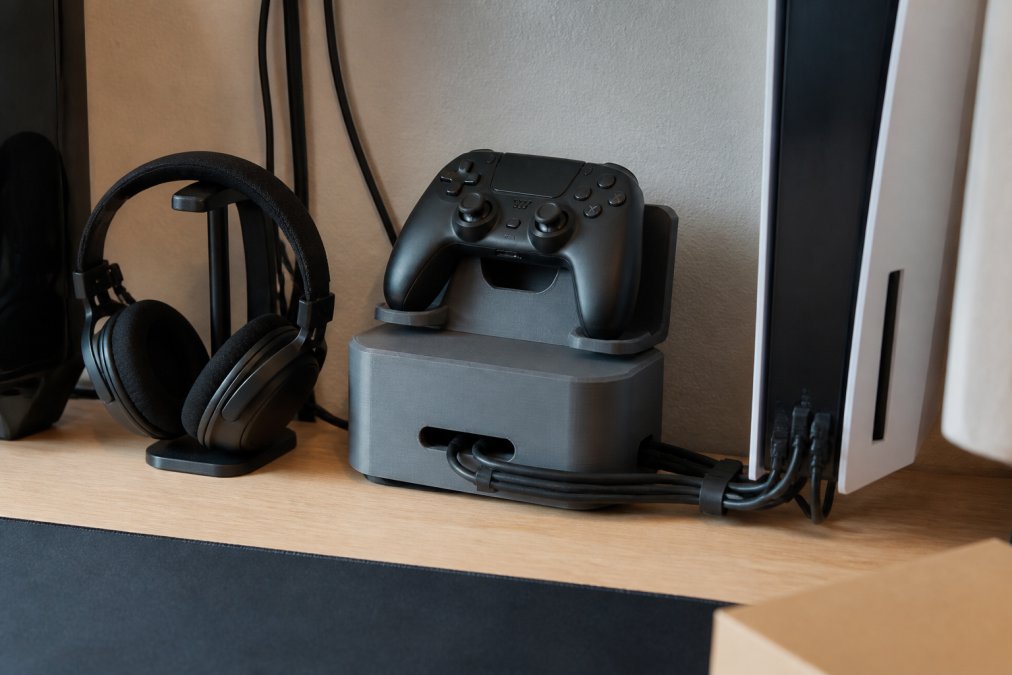
Setup ideas that actually work:
- Charging dock: a stand with a cutout for the charging cable, so the controller charges while displayed
- Cable channels: printed clips that snap onto the desk edge and hold cables in place
- Headset hook: a small arm attached to the stand's base for hanging headphones
- Modular stack: two cradles side by side for a two-controller household
Post-Processing and Weight Testing for Long-Term Durability
A stand that passes that test handles daily use. One that creeps or flexes needs more walls or a different filament.
Frequently Asked Questions
Are 3D printed controller stands strong enough for daily use?
Yes, when printed with the right settings. A durable 3D printed controller stand made from PETG with 30% infill and 0.2mm layer height can easily support a controller's weight. The key is avoiding thin walls and low infill. Our products are crafted with attention to detail and durability, designed to stand out for their charm and functionality.
What is the best filament for printing durable gaming accessories?
PETG is the best all-around choice for gaming accessories because it resists impacts and won't warp in a warm room. PLA works for decorative pieces but can become brittle over time. ABS is tough but requires an enclosed printer. For a controller stand that sees daily use, PETG offers the best balance of strength and ease of printing.
Do 3D printed controller stands scratch gaming controllers?
Not if you design or finish them properly. Sharp edges or rough support marks can scratch. Sanding contact points with fine-grit sandpaper and adding felt pads or a thin rubber liner prevents scratches. Our products are crafted with attention to detail and durability, designed to stand out for their charm and functionality.
How do I ensure my 3D printed controller stand is stable?
Stability comes from a wide base and low center of gravity. Print with a brim for bed adhesion, use at least 3 perimeters, and add rubber feet to the bottom. If your stand still wobbles, increase the base size or add weights inside the base during printing. A stable stand won't tip when you grab your controller.
Store-bought stands crack, wobble, and fit one controller only. CamGait3D Creations prints stands built around PETG durability, modular snap-fit parts, and cable management channels that keep your desk clean. Browse our 3D printed gaming accessories to find a stand designed for daily use, or reach out about custom designs for your setup. Shop all of our designs and print a stand that outlasts the console.