

Table of Contents
- Why Gamers Are Buying Custom 3D Printed Gear in 2026
- Best Materials for 3D Printed Gaming Accessories
- Custom 3D Printed Mouse Shells: Weight, Grip, and Fit
- 3D Printing Service Cost Calculator: What You'll Pay
- How to Design and Order Your Own Gaming Gear
- What Competitors Miss: Post-Processing and Long-Term Durability
- Frequently Asked Questions
Last Updated: September 19, 2026
Why Gamers Are Buying Custom 3D Printed Gear in 2026
Buying custom 3D printed gaming gear means ordering peripherals made to your exact specifications, from a mouse shell shaped to your grip to a headset stand sized for your desk. We've watched this shift move from niche hobby forums into the mainstream, driven by one fact: factory peripherals are built for the average hand, and almost nobody has an average hand.

Best Materials for 3D Printed Gaming Accessories
The best material for 3D printed gaming accessories depends on where the part touches your body, how much abuse it takes, and whether you care more about looks or survival. PLA wins on looks and cost, PETG on toughness, ABS or ASA on heat resistance, and resin when detail matters more than impact strength. But the material name alone tells you little, wall count, infill, and post-processing decide whether a part survives a season of ranked play.
PLA vs PETG vs ABS: Which Lasts Longer
PLA is the most common filament and the easiest to print, holding fine detail and coming in a huge color range, which is why decorative and low-stress parts use it constantly. The trade-off is heat and creep: a PLA part left in a hot car or beside a running console can soften and warp, and a PLA screw post under constant tension deforms even at room temperature.
| Material | Heat Resistance | Impact Strength | Best For |
|---|---|---|---|
| PLA | Low | Moderate | Decorative stands, dice bowls |
| PETG | Moderate | High | Grips, shells, brackets |
| ABS/ASA | High | High | Console-adjacent parts, warm desks |
| Resin | Low to moderate | Low | Fine detail, small figures |
| Tough/ABS-like resin | Low to moderate | Moderate | Cosmetic shells that get handled |
Resin Printing for Fine Details
Resin printing (SLA) cures liquid photopolymer with a light source, producing layers far thinner than any filament printer can manage, the right choice for miniature figurines, textured keycaps, and intricate logos.
How Filaments Actually Hold Up Under Competitive Use
Most sellers never test a part past the first print, the real gap in every material guide online. A practical durability check you can run yourself:
- Flex the part by hand and listen for cracking along layer lines
- Drop it from desk height onto a hard floor, twice, on different faces
- Cycle any moving joint (hinge, clip, latch) at least 50 times
- Leave it in a warm environment, a car on a summer day, or next to a console exhaust, for a few hours and check for warping
- Disassemble and reassemble the screw posts three times to check for thread stripping
Post-Processing Changes the Feel, Not Just the Look
- Sand progressively. Start around 220 grit to knock down layer lines, move to 400, then 800 for a matte finish. Wet-sanding PETG reduces clogging.
- Fill and prime. A filler primer hides the remaining ridges before paint. Two light coats beat one heavy coat.
- Seal the surface. A clear matte or satin coat resists hand oils and stops the part from feeling chalky after a few weeks of use.
- Consider vapor smoothing for ABS. A short acetone vapor bath melts the outer layer into a glossy, molded-looking skin. It works on ABS and ASA, not on PLA or PETG.
Custom 3D Printed Mouse Shells: Weight, Grip, and Fit
Custom 3D printed mouse shells let you change three things a stock mouse locks in forever: weight, grip shape, and button feel. A shell swap drops total mouse weight noticeably because printed shells use less internal material than molded ones, and you control the infill density that determines how much is solid plastic versus air.
3D Printing Service Cost Calculator: What You'll Pay
A 3D printing service cost calculator estimates price from four inputs: material volume, print time, machine rate, and finishing labor. Most services quote on volume plus time, then add setup and shipping. Knowing how each input moves separates a fair quote from an inflated one.
Breaking Down the Price of a Custom Print
- Material: charged per gram or cubic centimeter of filament or resin used. Standard PLA or PETG spools commonly run $15-$30 per kilogram; specialty filaments cost more. Resin is priced per liter and typically costs more per finished part than filament for the same volume.
- Machine time: an hourly rate covering printer wear and electricity. Hobby-level print farms quote a few dollars per hour; commercial services charge more because their machines and labor cost more to run.
- Setup: a flat fee for slicing, orientation, and supports. Some shops waive it on repeat orders of the same file.
- Post-processing: sanding, priming, and painting, usually billed per hour. This is the line item most buyers underestimate, a smooth, sealed finish can add more to the bill than the print itself.
- Shipping: varies by size and speed. Small parts ship in padded envelopes; large shells need boxes and often cost more to ship than to print.
Volume is the biggest lever: a hollow shell at 15% infill uses a fraction of the plastic of a solid one and prints faster, so infill density directly controls your bill. Layer height is the second lever, finer layers look smoother and take longer. A 0.2 mm layer height is a common middle ground for gaming parts.
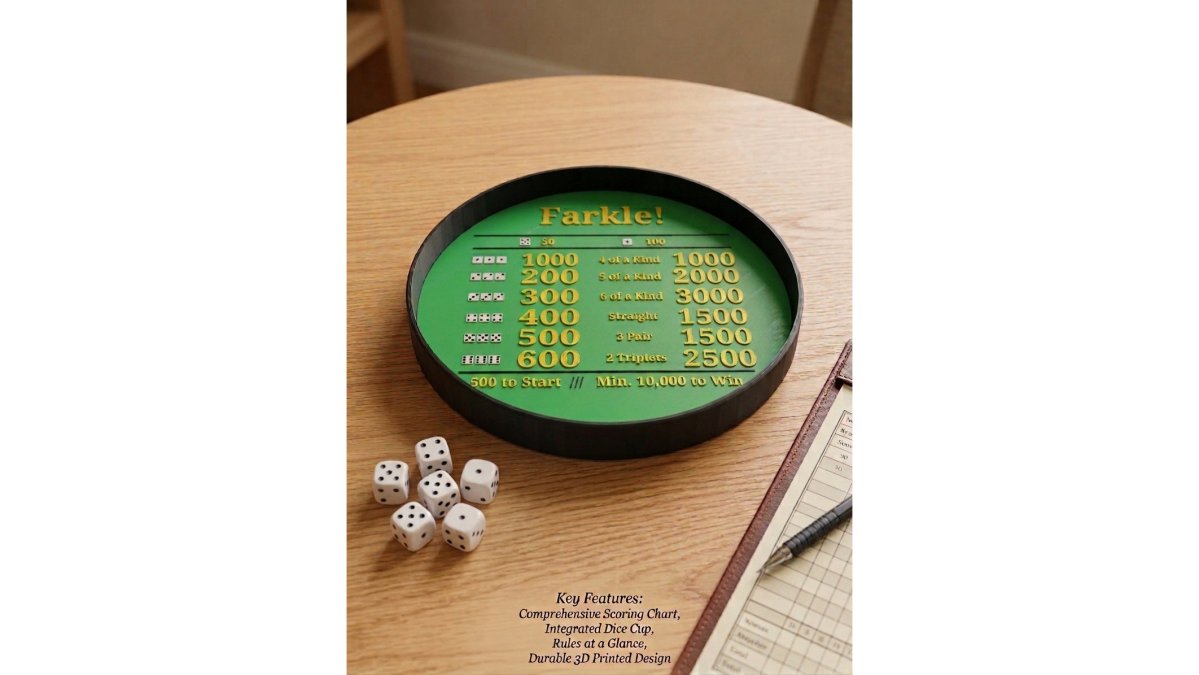
3D Printed Dice Rolling Bowl for →
A Realistic Price Range for Common Gaming Parts
Exact quotes vary by shop, file, and finish, but the pattern is consistent enough to plan around:
- Small accessories, keycaps, thumbstick caps, cable clips, controller stands. The cheapest category: little material, under an hour of printing. Expect single-digit to low double-digit prices per piece, with discounts on sets.
- Mid-size functional parts, mouse bungees, headset hooks, controller grips, small brackets. Material, print time, and post-processing all rise; these usually land in the low-to-mid double digits.
- Large or complex parts, full mouse shells, keyboard housings, multi-piece desk organizers. Long print times, higher material use, and often a test-fit step push quotes up, and shipping becomes a real line item.
- Resin display pieces, miniatures and detailed figures. Material cost per part is higher, but print time is often shorter than FDM for the same detail level.
How to Get an Accurate Quote Instead of a Surprise
- Repair the mesh first. Non-manifold edges and zero-thickness walls force the slicer to guess, and shops often pad the quote to cover the risk.
- State the finish you want. "As-printed" and "sanded and sealed" are different jobs with different labor. Saying which one you want up front prevents a revision charge later.
- Ask about a test fit on anything that mates with an existing device. A shell that has to slide onto a mouse PCB is not a one-shot print. Paying for a cheap test fit is almost always cheaper than reprinting the final part.
- Request the orientation before printing. Print angle affects both strength and surface finish, and a shop that rotates your part to save time may hand you a weaker one.
- Compare at least two quotes on the same file and settings. The spread between shops on identical jobs is often wider than the spread between material choices.
How to Design and Order Your Own Gaming Gear
Ordering custom gear follows a fixed path: model it, export it, quote it, print it, finish it. You don't need to own a printer or be a CAD expert to start.
From STL File to Finished Part
- Pick your part. Decide whether you need a controller mod, a keyboard housing, or a desk accessory.
- Model or download. Use free CAD tools for simple shapes, or download an existing STL file and modify it.
- Check the mesh. Non-manifold edges and zero-thickness walls cause failed prints. Repair them before quoting.
- Choose material and settings. Match filament type to heat and impact exposure, then set layer height and infill.
- Upload for an instant quote. Most services price the job automatically from your file.
- Approve the orientation. Supports and print angle affect both strength and surface finish.
- Finish the part. Sand, prime, and seal if you want a smooth, factory-like surface.
CAD design skills help but are not required. Plenty of successful orders start from a downloaded model with one dimension changed.
What Competitors Miss: Post-Processing and Long-Term Durability
Post-processing separates a part that looks printed from one that looks manufactured. Sanding with progressively finer grit, filling layer lines, and applying a clear coat changes the tactile feel completely, and a smooth, sealed surface resists dirt and hand oils far better than raw filament.
- Flex the part by hand and listen for cracking
- Drop it from desk height onto a hard floor
- Cycle any moving joint repeatedly
- Leave it in a warm environment to check for warping
- Inspect screw posts after repeated assembly
Frequently Asked Questions
Is there anything illegal to 3D print?
Yes. You cannot legally print items that infringe on copyrights or trademarks, such as replica gaming logos or patented designs. Under U.S. law, printing functional parts for personal use is generally fine, but selling them can violate intellectual property rights. Always check that your design does not copy a protected brand or character before you buy custom 3D printed gaming gear.
How much does it cost to get a custom 3D print?
Costs depend on material, size, and complexity. Use a 3D printing service cost calculator to estimate material and machine time. For reference, a ready-made item like the 3D Printed Dice Rolling Bowl for Farkle is $20.00.
Can you legally sell 3D printed items?
Yes, you can sell 3D printed items you design yourself or that use open-source licenses. You cannot sell prints of copyrighted characters or patented products without permission. If you plan to sell custom 3D printed gaming gear, keep records of your design files and licenses. Many creators use public domain or original designs to stay compliant.
What materials are best for 3D printed gaming accessories?
PLA works well for decorative items and lightweight parts like the Dice Rolling Bowl. Choose based on how much wear the part will get and whether it needs to flex or stay rigid.